Showing posts with label Mobile Tricks. Show all posts

Thursday, November 17, 2016

How to Remove the Background of a Picture with Single Click

how-to-remove-picture-background
Learn How to Remove the Background of a Picture easily with a Single Click. You can erase white background from your images or pics. gimp remove background. Online Remover. Gazing to remove the Background from a picture, yet aren't exactly certain how to isn't that right? Actually, regardless of on the off chance that you have Photoshop or not, you've gone to the ideal spot.

In this article we'll cover two separate techniques that will take care of business: one that uses Photoshop, and one that depends on a program based Web application. So today I am going to write an article that How to Remove the Background of a Picture with Single Click.

Steps to Remove the Background of a Picture

  1. First of all go towww.clippingmagic.com.
  2. Upload desired image to website by clicking y clicking Upload Image button.
  3. Then select background which you want to remove by download%2B%282%29 button.
  4. Then select the object which you want to protect from removing by clicking download%2B%281%29 button.
  5. After doing both steps click  download  button. This will clear your background.
  6. Then click on Download button to save your picture.
See Sample Image Below
person_1

Final Words: I wrote a full tutorial that How you can Remove the Background of a Picture easily with few steps. If you have any question or query related to removing of background image, feel free to comment below. We will reply as soon as possible. 
Read more »

Saturday, January 9, 2016

How To Get Apple Apps On Android (iPhone Emulator For Android)

Run Apple iOS Apps On Android 2015

How to get apple apps on android to run ios apps on android? iOS emulator for android is an easy way to run iphone apps on android 2015. Today on 100 Pak we are sharing the best possible ways to run ios apps on android.
Nowadays, as we all know all smartphones is either running on iOS or Android operating system, but to run ios apps on android device can be considered as a thing of distant past. Both the platforms have got a huge amount of satisfied customers and there are billions of applications which are developed for ios and android devices which can easily help in customizing the smartphone and apple apps on android devices and making the work easy.

But you would be stuck with issues on how to get apple apps on android as you would like to fing various cool apps in other OS while using a standard OS. It means that you may find an interesting iPhone application which would be informative, convenient and the best ios emulator for android, but due to the differences in the operating system, you would not be able to use them. But now it is possible as you have ios emulator for android which can help in using the ios application on the Android devices.

How To Get Apple Apps On Android 2015

how to get apple apps on android
iOS Emulator For Android
It is very much amazing to run an ios apps on a iPhone devices, but with the revolution and advancement in technology, one can simply achieve great results on how to get apple apps on android. All it takes is a single android application or ios emulator for androiddevice to ensure that you can make your mobile compatible for various OS run programs like the run ios apps on android app. The ios emulator available in the Androiddevices ensures that you are able to run all your favourite iOS application on any OS run devices. This articles discusses about how it can be done.


How To Run iOS Apps On Android:

For Andorid users, this is a good news. They can easily use the iPhone run applications or games on their Android phones. This dream of using the iPhone applications or ios emulator for android application is possible because of iEMU & Cider which is an Android application device and one of the best run ios apps on android application.

1. iEMU Application To Run iPhone Apps On Android

This is one of the best android application which can be used to get apple apps on android. It is very easy to install and use, first check our some features of the iEMU android application.
iEMU to get apple apps on android
iEMU

Features Of iEMU iPhone Emulator For Android:

  • You can access the iOS application on any Android Apps device easily and without any issue.
  • The experience of using this iOS application tool or ios emulator for android application provides you with various benefits and you can have a good time in using this run iphone apps on android.
  • There is no cost involved in downloading the run iphone apps on android tool on your smartphone
  • The apple apps on android tool has been extensively tested and works quite well. There is no issue or any kind of trouble while using it.

Steps To Download And Use iEMU To Run Apple iOS Apps On Android:

  1. First download the iEMU application from below download section
  2. After downloading, transfer the apk file to your android device and install it
  3. This iEMU app will take around 61MB size in your app storage
  4. It will be installed in your android device with the name of padiod.
  5. Now open this padiod application and start using the iOS apps on your android device
  6. This padiod application of iEMU will only support .ipas & .zip files

Download iEMU iOS Emulator For Android

iemu to get ios apps on android

2. Cider (Cycada) To Run iOS Apps On Android

Cyder is also one of the best android app to run iphone application on android devices. It is very easy to use this cyder application in your mobile.

Cider cycada iphone emulator for android

Why Cider is considered as an iphone emulator for android?

Cider is one of the cool ios emulator for android application which can be used for running the iOS application on Android devices. With this application, we can enjoy all kinds of iOS games and application on the Android devices and know on how to get apple apps on android. The developers of this run ios apps on android application are six students. According to this team of six students, they feel both Android and iOS are running on the ARM run hardware. For programmers or developers, they won’t be needing any coding language for writing the software as the binary coding are converted for running the program related to run iphone apps on android devices. That is what one of the developers said about this run ios apps on android tool.


Practically, this tool has been experimented and once installed they can be used for running the iOS applications on the Android devices and even know on how to get apple apps on android. However, there is one disappointing aspect of the Cider (one of the best ios emulator for android app), which is that it does not support Bluetooth, GPS, and other location based services. Currently Cider is still in the advanced stage of research and in the coming days, it would be available in the market as one of the best iphone emulator for android devices. You can get the entire information online about this run ios apps on android tool and easily download the best apple apps on aandroid

Conclusion:

Frankly, this is an awesome apple apps on android tool which can easily help in running your favourite app or games on any OS run devices. Plus this run iphone apps on android tool is free to use and you can easily run iphone apps on android devices without any interruption. Furthermore, it your have enough RAM space, then there would no effect of this ios emulator for android tool on your Android device. So go ahead and download the iphone emulator for android app and enough an everlasting experience on how to get apple apps on android devices.
We hope you enjoy our best ios emulator for android to run ios apps on android. If you like, you can even share this best iphone emulator for android with your friends. If you have any doubt you can even comment below, we will try to solve it. Kindly bookmark this page to get more updates on ios emulator for android to run ios apps on android.
Read more »

Friday, January 8, 2016

How To Find IMEI Number Of Lost Android Phone

Find IMEI Number Of Lost Android Phone

There are a lot of extensive features provided by Android devices for users. So, it is no surprise to see that it has become the number one choice among millions of mobile/smartphone users. There are variety of options which you can do with your Android device by simply adding the google account of yours on the Android device, making you the super admin of the Android device. Plus with this Google account, you can easily check out for the smartphone which has got lost.

Now to track or find out the lost Android device, you would be needing the IMEI number. However, what happens when you don’t have it or forgot the IMEI number. Don’t worry. There is a major solution for it where you can get the lost or forgotten Android IMEI number. Yes! It is quite easy for getting the IMEI number of the device. This is possible if you check out the given methods.

Recover or Find You Android Mobile IMEI Number

Find imei number

It is very easy to find imei number of your lost android mobile. Below given is the best method to find our the lost IMEI Number of lost android phone:

1. First you need to open your internet browser on your computer or you mobile

2. Now visit this website: Google Dashboard

Find IMEI number

3. Login with your google account that you used in your android device. You will see  the above given snapshot in your browser.

4. Now choose the android option in Google Dashboard

5. Here you will see the total information of IMEI, model number and many others related to your device

How To Find IMEI Number

6. Just note down the IMEI number of your lost android mobile from tracking

7. Thats it. You are done with the process of recovering lost IMEI number of android mobile

An IMEI number is one of the suitable procedure of tracing your cellphone and for getting the number. For getting the IMEI number, there are certain steps which you need to follow.  With the given method you can track the lost Android and get the IMEI number and find out the person who has stolen the Android device.

Read more »

How to Download and Install Whatsapp on iPad or iPod without jailbreak

Whatsapp is most popular chatting and sharing app for smartphones. But it’s not available for all apple smartphones, its only available for iPhone and not for iPad or iPod. So users of iPod or iPad wants to know how to download and install whatsapp on iPad or iPod without jailbreak. So here is step by step instructions for you to let whatsapp work on your iPad or iPod.

How to download and install whatsapp on iPad or iPod without jailbrak

Things you will need in this process

  1. An iPod or iPad in which you want to install whatsapp
  2. iTunes
  3. ifunbox
  4. A PC
  5. An iPhone which helps you inactivating whatsapp

Step by step instructions to download and install whatsapp on iPad or iPod

  1. First thing you have to do is to download and install iTunes on your PC. If you already iTunes installed on your PC then move to second step.
  2. Now open iTunes media folder.Here are the paths for different operating systems.
    For Windows : C:\Users\Username\My Music\iTunes\iTunes Media\Mobile Applications\
    For Mac OS X 10.7 Lion : ~/Music/iTunes/iTunes Media/Mobile Applications/
    For Mac OS X 10.6 : ~/Music/iTunes/Mobile Applications/
  3. Now you have to find whatsapp file in this folder and have to copy it in any other folder of your choice. Remember that file type of whatsapp is IPA.
  4. Now its time to download ifunbox. After installing it start ifunbox application and connect your iPod or iPad with PC.
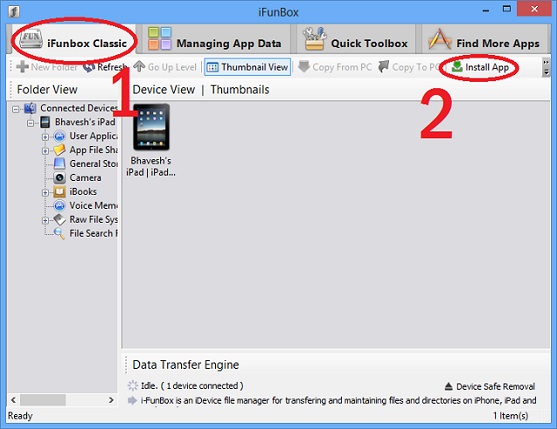
  5. Now click on ifunbox classic tab and then click on install appbutton and then select the whatsapp IPA file that we copied in the third step.ifunbox classic tab whatsapp
  6. Whatsapp now installed on your ipad or ipod but still it will not work. Now you need an iPhone for further steps to perform. So take an iPhone and unistall whatspp from it if it already installed and then reinstall it and activate with the cell number you are using on iPad or iPod.
  7. Now connect your iPhone to computer and go to ifunbox and copy Documents and Libraryfolders to your PC which you find under ifunbox classic tab after going in your iPhoneuser applications folder and selecting whatsapp folder.copying whatsapp files from iphone
  8. Now de-attach your iPhone from PC and attach your iPod or iPad again. Now run ifunbox and again go to same ifunbox classic tab and select whatsapp folder under user applications folder. And then copy the Document and Librat files you copied in previous step in whatsapp folder. Wow you now have installed whatsapp on your iPod or iPad.copying whatsapp files to ipod
Hope you now have learned how to download and install whatsapp on iPad or iPod without jailbreak. For more useful tutorials and tips explore 100 Pak
Read more »

How to Connect Q-Mobiles to Computer using PC-Suite

How I’am connect my Q-Mobiles(All Models) to computer is very common question on  forums, blogs and on Facebook. Specially Pakistan Peoples interface problem when they want to connect your Q-Mobiles to computer transfer data PC to computer/computer to PC make connection to network whatever they want to do. PC suite always used to connect mobiles phones to computer.

Similarly Q Mobile PC_Suite is used make connection PC to computer. Most of the publisher Just uploads Q-mobile PC Suite free but they not tell the exact Method to used Suite.Visitor asking about how i used Q-PC Suite but no one has given reply of this till now. Today I Specially publish this post and i will tell you that how you can get Q-Mobile Pc Suites,Drivers and install all these applications and software’s on your any Q Mobile Series.

Q-Mobile Promise with their Customers:

Q Mobile Star their business promise with users they provide reliable and Quality mobiles phones on moderate price and  not sell or rent your personal information to third parties for their marketing purposes without your explicit consent.Q-Mobile company Products amazingly their company going to become the biggest Mobiles phone’s Company of Pakistan.The Company produce several Phones Models like  array of affordable touch screen, QWERTY and WiFi enabled mobile phones, making it a complete, reliable and trusted mobile brand.

Connect Q-Mobiles to Computer Steps by Step:

Firstly Go Qmobile official website Search your Phone Model by typing your phone Model in search box located in right top coroner.They will show your phone description and reviews.They will also give you download button to download your phone drivers and pc suite. For example I have search for “Q phone-i9” and they have give me link to download Drivers and suite. Figure show the results.

Note :
Downoad q-Mobile pc-suite and drivers on Qmobile official website and going to download pc suite any other download website because they are not compatible with your device.Install Q-Mobile Drivers and then install Q-Suite.Using the USB cable connect your Q mobile to computer.Q mobile PC suite automatically detect your Q-mobile and connect it to PC See the Proof screen Shot below. This screen shot is taken while i connect my q mobile to pc and he detect my mobile.Now you can easily access your mobile contacts , messages , MMS as well as memory cards

Screen Shot Proof:

See the proof screen shot while I’m connect my q mobile to my PC and  he detect.

Read more »

(10+) Best Free Mobile Dating Apps 2015 | Android & iOS

Top Free Dating Apps 2015

Best free dating apps a most widely search term in the internet. People search for top free dating apps 2015 & best mobile dating apps. Here on 100 Pak, we are sharing all new andbest free dating apps 2015 on the special demand of our visitors.
No doubt online dating has taken romance to a new level. Swingers and singles all around are looking out for faster and better means for seeing people on the fly. And the best means is through the smartphone and using the best free dating apps. The kind of popularity thesetop free dating apps have is remarkable and it is expected that such best mobile dating apps are bound to reach over one billion dollars this year, and this is somewhat expected to double the revenue in the coming five years.

Best Free Dating Apps 2015

top best free online dating apps 2015
Best free dating apps 2015
If you are an individual who has got trouble in finding a particular date in the old fashioned manner, the you can try such popular dating apps. Each of these online dating apps is free but one might require a premium membership or a credit card for receiving or sending messages.


The following are some of the dating apps free to use:

1. Lovoo Top Free Dating App 2015:

The next awesome and best free dating apps or online dating apps in this list is the Lovoo.
lovoo dating apps
Lovoo Free Dating Apps
This application has got a Live Radar which shows the other Lovoo users who are there nearby and in what direction they are. You can select how far or close you want to search and you can get the graphical representation of the individuals who are looking for love just like you. Of course, you won’t have to share the location in case if you don’t prefer to. However, the Lovoo which is one of free online dating apps has a verification feature which tries to make this dating application quite safer.
Download Lovoo: iTunes | Google Play

2. Grindr Best Mobile Dating App 2015:

The Grindr is one of the first location related and best free dating apps for bi, gay and curious related guys having more than four million users in about 192 countries all over the world.
Grindr online dating apps
Grindr Dating Apps Free
Having about 1.1 million users who log on daily basis in this list of online dating apps, the Grindr application which is one of top free dating apps provides a lot of opportunity to meet the right kind of person in your area. If you are a free member in one of the popular dating apps and mobile dating apps, you can view about 100 profiles present in your area whereas the Grindr Xtra which is a premium paid version of dating apps free or one of the free online dating apps that has a push notification even though the application is closed. This best free dating apps and popular dating apps you to view who is online and lets you see about 300 profiles without any banner ads.
Download Grindr: iTunes | Google Play

3. Badoo Popular Dating Apps:

Having a community of more than 150 million users all around the world, the Badoo is best free dating apps in terms of mobile dating. The navigation of one of this best mobile dating apps are easy and quite fast and this is a great option for chatting, dating, sharing interest, making friends, etc.
In this top free dating apps, if you are a free member of this dating apps free then you can contact about ten people in a day and premium members who pay about $2.99 use the ‘Superpower’ feature which includes the Spotlight that assist you in reaching to the top of the search list using one of the popular dating apps.
Download Badoo: iTunes | Google Play

4. MeetMe Best Free Dating App 2015:

Having more than about 90 million users, this is one of the best free dating apps and online dating apps provides a great opportunity to meet new buddies, hang out with them and even with the existing friends and chat and even find a love connection in the given process.
MeetMe free online dating apps
MeetMe Dating Apps Free
Being one of the major location related app and the best free dating apps  or best mobile dating apps which is currently available online, the app has got various free features which allows you to view any potential individuals nearby and even chat with them immediately (for which you need to install the Kik app like most of the dating apps free) and get the potential mates. This is one of best mobile dating apps and popular dating apps which has got premium membership option and is one of the online dating apps which allows you to buy credits so that you can spotlight yourself to get more possibilities.
Download MeetMe: iTunes | Google Play

5. OkCupid Online Dating App 2015:

OkCupid is one of the most famous and best free dating apps. Currently this is one of theonline dating apps available in mobile applications and this is one of best mobile dating apps that allows one to experience a go and meet situations present in areas and that too in a fun and full in depth manner.
OkCupid best free dating apps
OkCupid Top Free Dating Apps
Just like the normal dating and online chat sites and top free dating apps, here you can interact and chat with new individuals, rate the various profiles and even have the option to broadcast dating suggestions. This is one of the best free dating apps and dating apps free which is quite fast and easy to navigate. Plus it allows you to share information about yourself in order to get better matches. Frankly, this is one of the best mobile dating apps which is quite lighthearted and fun in using and you can never guess who you might find.
Download OkCupid: iTunes | Google Play

6. Zoosk Free Online Dating App:

If you are not having any luck with the above given best free dating apps, then there are various other top free dating apps such as Zoosk. This is one of the best mobile dating apps is created for learning the kind of individuals whom you like especially when you are using it more.
top free dating apps zoosk
Online Dating Apps Zoosk
This is slightly a different approach when compared to other best mobile dating apps (it is a common to not know what one knows in the first instance). In this best free dating apps and dating apps free, there is a photo verification tool which allows one to verify if the given photo which is submitted belongs to you  through the video submitted by the users. So, this means that you are bound to get more matches which you can trust with one of this top free dating apps and free online dating apps.
Download Zoosk: iTunes | Google Play

7. eHarmony:

This is another and best free dating apps and best mobile dating apps which is even free to download. Here you can create a free account and with that you can be able to fill in the relationship queries and easily get the online dating personality profile.
Dating Apps Free eHarmony
Free Online Dating Apps eHarmony
Plus with this and one of the top free dating apps you can even upload the photos, get daily matches which are compatible and send smiles to those matches, take the help of ‘Guided Communication’ to chat with the potential matches (which is possible through make and break questions, pre-defined fast questions, three open ended questions, etc) and then you can plan the date with the help of this app. If you have subscribed too this app, then you can easily talk with the matches selected by you and view the photos of the matches, use additional features and more. The premium version of one of this best mobile dating apps and free online dating apps cost about £14.99 each month.
Download Zoosk: iTunes | Google Play

8. Tinder:

One of the dating apps free which you have often heard about a lot is the Tinder.
best free dating apps tinder
Top free dating apps Tinder
This app is quite much based on the face-value and if you are seriously looking for some kind of committed relationship irrespective of looks, then this is  one of the best application and free online dating apps to use.
Download Tinder: iTunes | Google Play

9. Bumble Best Free Dating App:

This is quite similar to the Tinder but the only difference is that there is more of girl power involved in it compared to other best mobile dating apps.
dating apps free Bumble
Bumble Best Free Dating Apps
Basically, being one of the top free dating apps and free online dating apps the Bumble is simply based on the mode of physical attraction and here a similar kind of swipe system is used. But the only difference here is that only girls can start the given notifications. However, there are certain exceptions and major tactics which guys can use for encouraging the girls to chat and this includes extending the basic conversation for a period of 24 hours which is present in free online dating apps.
Download Bumble: iTunes

10. Meet Moi

Since launched in about 2010, the Meet Moi is one of the free online dating apps which is the top location related mobile application, having more than about three million users which makes it dating apps free. With this best free dating apps you can easily receive push notifications whenever there is a match which is present nearby. Now in this top free dating apps, if you accept the given match from this popular dating apps, then you can chat with the person for free before you can decide if you really want to meet that person.
meetmoi best free dating apps
MeetMoi Online Dating Apps
This is one of the best free dating apps and online dating apps which has got various free services that includes sending a wink and replying to messages. In case if you are one of the premium members of this best mobile dating apps and dating apps free, then you can easily chat with every user present in the app and see who has checked out your profile. And if you want to make the dating more sociable among the popular dating apps, then you have the option to invite a MeetMoi or Wingman who would make introduction to other groups that are nearby by using this online dating apps.
Download MeetMoi: iTunes
To conclude, there are various and best free dating apps 2015, the above given are some of the best. In the world, where mobility has become the go-to kind of communication, then there is not other better time to give these top free dating apps and online dating apps a chance for usage. If you like you can share this awesome list of best online free dating apps for android and ios with your friends. Click on your favourite social media sharing options from below and share it. Enjoy and bookmark this page to get latest updates on best free dating apps 2015.
Read more »

How to Control YouTube in PC with Smartphone?

How to Control YouTube in PC with Smartphone?

YouTube is a video-sharing website headquartered in San Bruno, California, United States. The service was created by three former PayPal employees in February 2005. In November 2006, it was bought by Google for US$1.65 billion. YouTube now operates as one of Google's subsidiaries. The site allows users to upload, view, and share videos, and it makes use of WebM, H.264/MPEG-4 AVC, and Adobe Flash Video technology to display a wide variety of user-generated and corporate media video. Available content includes video clips, TV clips, music videos, and other content such as video blogging, short original videos, and educational videos.


Most of the content on YouTube has been uploaded by individuals, but media corporations including CBS, the BBC, Vevo, Hulu, and other organizations offer some of their material via YouTube, as part of the YouTube partnership program. Unregistered users can watch videos, and registered users can upload videos to their channels. Videos considered to contain potentially offensive content are available only to registered users affirming themselves to be at least 18 years old.

How to Control YouTube in PC with Smartphone?

#01: Connect PC and Smartphone with same Internet Connection i.e. WiFi

#02: Now Go to www.YouTube.com/tv


#03: Click on Left Sidebar.

#04: Select Settings from it
How to Control YouTube in PC with Smartphone?
#05: Then Click on Pair Device Box.

#06: It will show you a Pairing Code.

How to Control YouTube in PC with Smartphone?
#07: Now Open YouTube's Official App in your Phone

#08: Go to Settings (by click three dots from top right corner)

How to Control YouTube in PC with Smartphone?

#09: Click on Connected TVs

#10: Then Add a TV


#11: Add Pairing Code to Phone that appears in PC

How to Control YouTube in PC with Smartphone?

#12: Done

#13: Now Play any YouTube Video in Phone and it will Play in PC.

Read more »